

Problem Statement
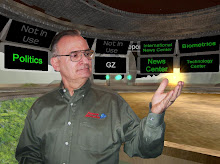
Smaller towns and municipalities cannot afford to build crisis action centers to handle emergencies and disasters. Larger cities that can afford such facilities often build them where a disaster happens rendering their facility useless. Finally, national and state representatives often loose valuable time when traveling to a disaster site to coordinate efforts. They are often ineffective on arrival because the resources they need remain at their respective agencies.
Description
The
Evaluator Briefing:
http://vr4yourpc.com/PPT/RDECOM_Eval.ppt
Web Page:
http://www.vr4yourpc.com/killeen.html
Project Briefing:
http://www.vr4yourpc.com/PPT/KilleenProject.ppt
Killeen Crisis Action Center Tours are by appointment - contact:
vr4yourpc@aol.com
ACCESS INSTRUCTIONS
The Killeen Texas Crisis Action Center can be accessed from the world "Harps" here are the instructrions:
- Download and install the application
- On initial start up select "Autoconfigure"
- Sign on as a tourist
- You will arrive in AW Gate ask the Gatekeeper any questions
- Read the “How to move” web page
- Look on the left side for the Tabs
- Select the Worlds TabScroll down the list and select "Harps“Click "Teleport" on the menu bar top left
- Pull down to "make this my home"- The next time you turn AW on you will arrive in Harps
Alternate method 1:
- Once in world, Click the "Teleport" word in the menu bar then To.(top left)
- A small window opens
- Put Harps in the world field and - 0 N 0W in the coordinate field
- Click OK and you will go directly there
Alternate method 2
- Sign on to ActiveWorlds
- Copy and paste this link below into the chat field press "Enter" key
- Click the link in the posted chat.

No comments:
Post a Comment